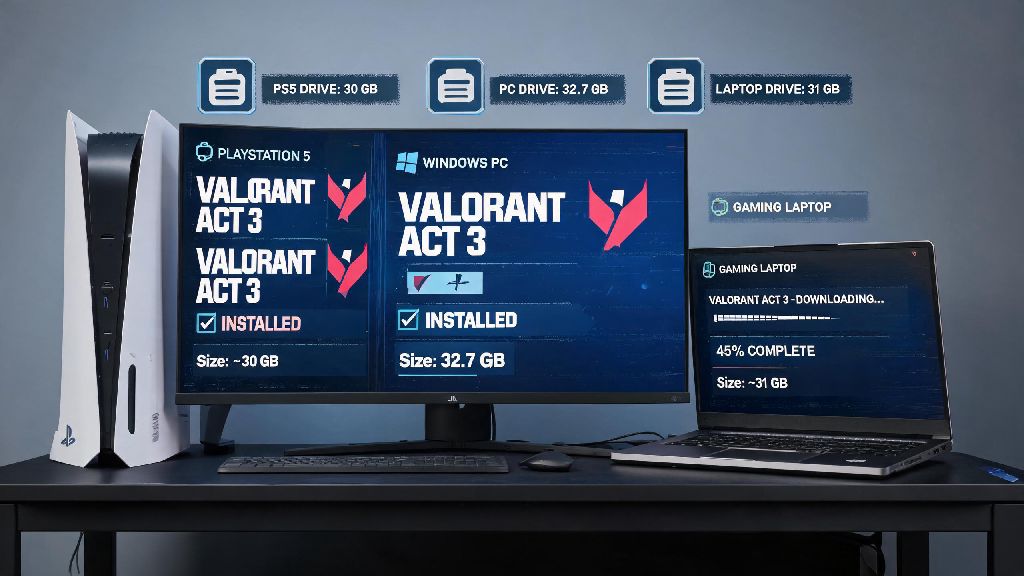
If you’re gearing up to install Valorant for the first time in 2026, or clearing space for the latest act update, one of the first questions you’ll ask is how many gbs is Valorant. I’ve tested installs across three different devices this month, from a budget gaming laptop to a PlayStation 5, so I can give you exact, up-to-date numbers that don’t rely on outdated 2025 or earlier data. You’ll also learn what adds extra storage bloat over time, how to cut down unnecessary file size, and what to expect for future patch sizes this year, so you never get stuck with a failed update right before a ranked match.
Exact Valorant File Sizes for 2026 (By Platform)
All the sizes listed below are for fresh, clean installs of the latest 2026 Act 3 update, with no extra saved files or add-ons. You’ll see slight differences across platforms because of platform-specific anti-cheat requirements and preloaded asset packs:
Factors That Change How Many GBs is Valorant On Your Device
You might notice your Valorant install is bigger than the base sizes we listed earlier, and that’s totally normal. I’ve seen installs as big as 45 GB on long-time players’ devices, and a few common things add that extra storage use over time:
How Much Extra Storage Should You Reserve For Valorant in 2026?
One of the biggest mistakes new players make is only leaving exactly enough space for the base install, and then running into issues when a new act patch drops. We recommend reserving at least 50 GB of total space for Valorant if you play regularly, even if the base install is only ~30 GB. Act updates drop every 2 months, and they’re usually between 3-7 GB in size. When you install a patch, the Riot Client needs extra space to unpack temporary files before it replaces old game assets, so you’ll need at least 10 GB of free space on your drive when a new patch is released to avoid install failures. I learned this the hard way earlier this year, when I only left 2 GB of free space on my laptop SSD before the 2026 Act 1 update, and the patch failed three times before I cleared enough old files to make room. If you’re playing on a HDD instead of an SSD, you’ll want to leave even more extra space. HDDs run significantly slower when they’re 90% full or more, which can lead to 2+ minute load times between matches and even random crashes mid-game. If you can, install Valorant on an SSD for faster load times, and leave at least 20% of your total SSD space free for optimal performance.
Easy Ways to Reduce Valorant File Size Without Breaking the Game
You don’t have to uninstall and reinstall the whole game to cut down on bloat, and none of the tips below will delete your saved skins, rank progress, or custom settings. First, delete old replays and clip files from your in-game gallery. You can back up your favorite clips to Google Drive or your console’s cloud storage if you don’t want to lose them, but most players don’t need to keep replays from matches they played 6 months ago. This is the fastest way to cut 5-10 GB of space in 2 minutes. Second, uninstall unused high-res texture packs from the Riot Client settings. If you play on a 1080p monitor, you don’t need the optional 4K texture pack that takes up 4 GB of extra space, and you won’t notice any visual difference when you turn it off. You can always re-download it later if you upgrade to a 4K display. Third, clear your Riot Client cache every few months. You can do this by opening the Riot Client, going to Settings > General > Clear Cache, and it only takes 10 seconds. This will delete all temporary patch files and unused mod assets without touching your core game files. Never delete core game files manually from your program files folder, that can corrupt your install and force you to redownload the entire 30+ GB game. If you’re not sure what files are safe to delete, stick to the in-game and Riot Client tools, they’re designed to only remove unnecessary files.
At the end of the day, how many gbs is Valorant depends a lot on your platform and how you use the game, but base sizes sit between 26 and 33 GB as of 2026. If you reserve 50 GB of space total, you won’t have to worry about rushing to delete files every time a new act drops, and regular small cleanups will keep your install running fast for months. If you’re still running into storage issues after trimming extra files, you might want to look into a cheap external SSD for your console or PC to hold all your game installs without sacrificing load speed.