You’re on your PC grinding a Valorant unrated match, and your console-owning buddy texts you begging to join the queue. The first question you both ask is, can you play Valorant cross platform? I’ve been playing Valorant since the closed beta, and I was one of the first players to test the console launch version last year, so I’ve spent dozens of hours messing with cross play settings, troubleshooting invite errors, and asking Riot support directly about feature roadmaps. I’m breaking down exactly what works, what doesn’t, and how to avoid common frustrations when playing with friends on different systems.
Can You Play Valorant Cross Platform Across All Devices?
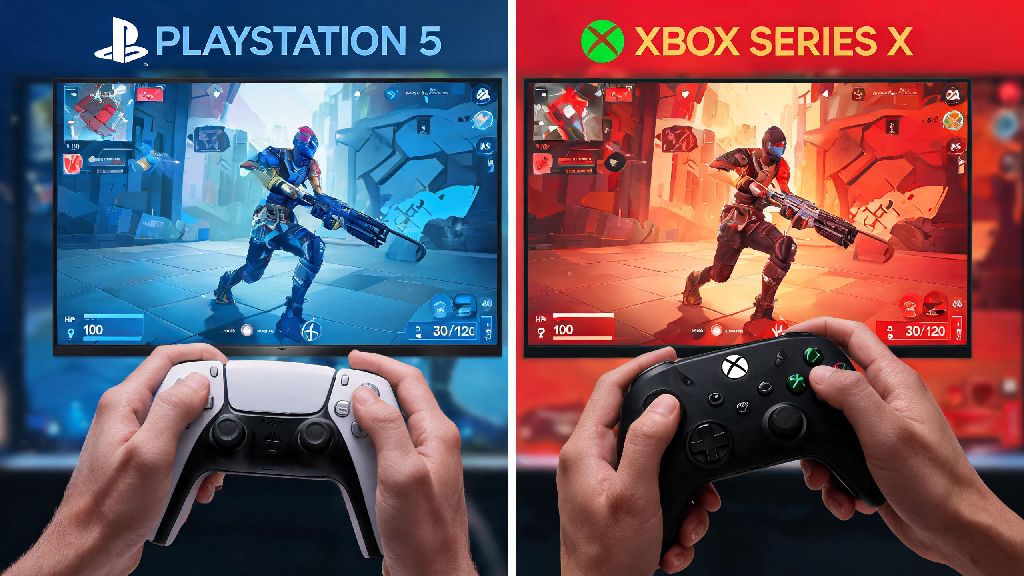
The short answer is yes, but only for specific platforms. Cross play is only supported between console platforms (PlayStation 5 and Xbox Series X/S) as of now. If you and your friend both play on console, no matter if one has a PS5 and the other has an Xbox, you can queue for any game mode together without restrictions. I’ve queued for dozens of competitive matches on my PS5 with Xbox friends, and the only difference I’ve noticed is slightly longer queue times during off-peak hours, which is barely noticeable.
There is no cross platform play between PC and console versions of Valorant right now, and that choice was intentional on Riot’s part. During internal playtests, the team found that mouse and keyboard players had a 30% higher win rate than controller players in mixed lobbies, even with generous aim assist enabled for controller users. That gap is too large for fair competitive play, especially in ranked modes where fair matches are the top priority. Riot didn’t want to force console players to go up against PC users with far faster aim and reaction time for flick shots and precise movement, so they kept the two player bases separate for now.
You might be wondering why other FPS games support PC-console cross play and Valorant doesn’t. Most of those games are casual-focused, or they have far looser competitive balancing standards. Valorant’s entire competitive ecosystem is built around fair, equal matches for all players, so adding cross play before the input gap is fixed would break that core promise to the player base.
How Cross-Progression Works for Valorant Across Platforms
Even if you can’t play cross platform between PC and console, you can still sync all your account progress across any device you play on. You only need to link your Riot account to your console platform account once to sync all progression, and the process takes less than two minutes from the in-game login screen. All your paid skins, battle pass tiers, agent unlocks, ranked rank, and even your in-game friend list will carry over to any linked platform immediately.
The only thing that doesn’t carry over is platform-specific currency, like PlayStation Store credit or Xbox gift card funds. But any Valorant Points you purchase on one platform will show up on all linked platforms, so you don’t have to re-buy currency if you switch between PC and console. If you bought a premium skin bundle on PC back in 2022, you’ll have access to that same bundle on your PS5 or Xbox as soon as you link your account, no extra purchase needed.
You can unlink your account if you want, but you’ll lose access to all synced content on the unlinked platform, so it’s best to only link accounts you own permanently. I made the mistake of linking my Riot account to a friend’s PS5 to test the console version last year, and I had to go through a 3-day support ticket process to unlink it so I could connect it to my own console later. Save yourself the hassle and only link accounts you control long-term.
Tips to Squad Up With Friends on Different Supported Platforms
If you’re a console player looking to queue with friends on other console systems, these tips will help you avoid the most common errors I ran into during my first few weeks of cross play:
Adding friends via Riot ID is the most reliable way to send cross platform invites on console. If you try to add friends via your platform’s native friend list, you might run into sync issues, especially if one of you has privacy settings turned on. I’ve had so many friends mistype my gamertag and send invites to random players instead of me, so double check that you’re entering both the display name and the tagline correctly, including the # and the numbers after it.
Cross platform voice chat works automatically, you don’t need any third party apps to talk to friends on other consoles, as long as your in-game voice settings are turned on. If you can’t hear your friend, check both your in-game voice settings and your console’s privacy settings to make sure voice chat is enabled for cross platform play. I spent 10 minutes troubleshooting a voice chat issue last month, only to realize I had accidentally muted cross platform chat in my PS5 system settings.
Is Riot Planning to Add PC-Console Cross Platform Play in the Future?
Plenty of PC and console players are begging for cross play between the two systems, and Riot has acknowledged that demand. Riot has not announced a firm release date for PC-console cross play, but they have shared that it’s part of their long-term feature roadmap. The main barrier right now is fixing the input advantage gap between mouse and keyboard and controller players, to make sure mixed lobbies are fair for everyone.
One solution Riot is testing is input-based matchmaking. That means if you’re a console player using a mouse and keyboard, you’ll be queued with PC players, and if you’re a PC player using a controller, you’ll be queued with console players. That would eliminate the input advantage gap entirely, but it’s still in early testing, so it could be a year or more before it rolls out to live servers. Riot has also mentioned they might test cross play for unrated modes first, where balance is less critical, before adding it to competitive ranked queues.
Even when cross play does launch, it will almost certainly be opt-in, so you can toggle it off if you only want to play with people on your same platform. A lot of players are worried they’ll be forced to play against PC players if cross play launches, but Riot has repeatedly stated that won’t be the case. You’ll get to choose if you want to join mixed lobbies or stick to players on your own device, so you don’t have to sacrifice fair matches to play with friends on other systems.
At the end of the day, the answer to can you play Valorant cross platform depends entirely on what devices you and your friends use. Console players can squad up across PlayStation and Xbox right now with almost no extra work, as long as you have cross play enabled in your settings. PC players will have to wait a little longer to join their console friends in matches, but Riot is actively working on solutions to make that possible without ruining the fair competitive environment the game is known for. Take 2 minutes to double check your account links and privacy settings before you queue with cross platform friends, and you’ll avoid 90% of the common errors people run into. If you’re still having issues, you can always check Riot’s official support page for updated troubleshooting tips, or keep an eye on their social media for announcements about new cross platform features.