You’re hyped to hop into a ranked Valorant match with your friends, hit the install button on the Riot Client, and suddenly get a pop-up warning you don’t have enough storage left. We’ve all been there, right? If you’re asking how large is Valorant, you’re not alone – hundreds of new players overlook storage requirements before trying to install the popular tactical shooter. The game’s size isn’t static either, it shifts with every act update, new agent drop, and optional content pack. We’re breaking down everything you need to know, from initial download size to long-term storage needs, so you can avoid annoying installation delays mid-queue.
How Large Is Valorant for Initial Download vs Post-Install?
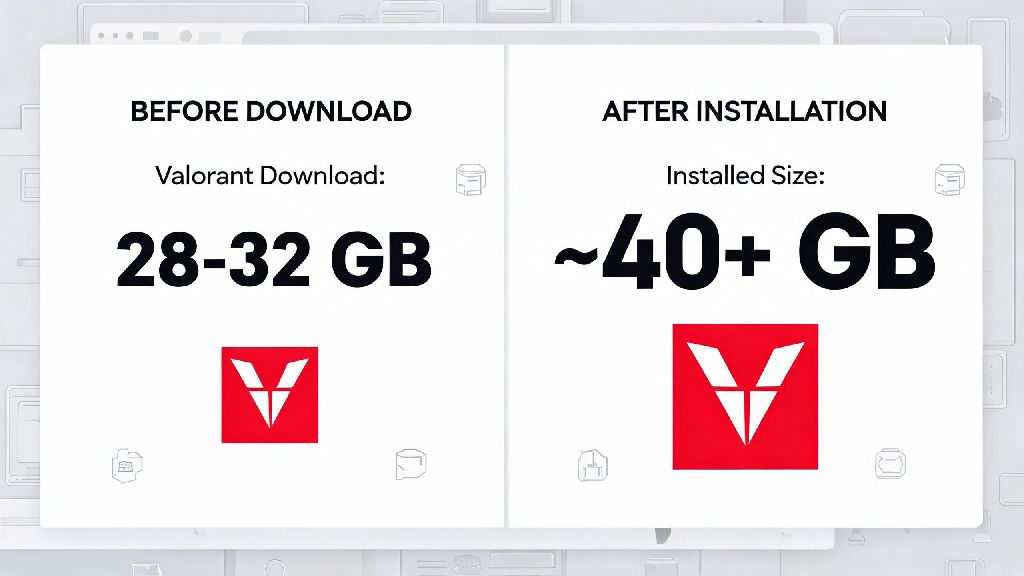
The initial download you get through the Riot Client is smaller than the final installed size, so don’t be fooled by the first number you see. As of the latest game update, the initial Valorant download sits at 28 GB to 32 GB for Windows PC users. That first download only includes core game files, default language packs, and the basic texture package for 1080p play. You’ll first download a tiny 65 MB Riot Client installer, which will then pull the full game files onto your device.
Once you run the game for the first time and install any pending patches, the post-install size jumps to 35 GB to 40 GB for most users. That size shift happens because the installer compresses files during download to cut down on bandwidth use, then uncompresses them once they’re on your hard drive. Riot’s Vanguard anti-cheat software only adds around 200 MB to the total size, so it’s not a major contributor to the game’s storage footprint.
If you’re running Valorant via Boot Camp on a Mac, the file size is identical to the Windows version, so you’ll need to reserve at least 45 GB of space in your Boot Camp partition to leave room for future updates. There’s no native Mac version of the game available as of now, and console ports haven’t been fully released, but early beta tests for console show a similar 35 GB to 40 GB base size.
What Factors Make Valorant’s File Size Grow Over Time?
It’s not unusual for long-time players to see their Valorant install size creep up past 50 GB after a few acts, and there are a few common reasons for that bloat. The biggest contributor is regular act and episode updates. Every act adds at least one new agent, one new map or game mode, and dozens of new skin lines, sprays, and player cards, which can add 2 to 5 GB of new content per update. Battle pass content is stored locally on your device even after the pass ends, so that adds to the long-term size too.
Optional content packs also add a lot of extra space if you download them. The high-resolution texture pack for 1440p and 4K play adds an extra 8 to 12 GB to your total install size, even if you rarely play on a higher-resolution monitor. Multiple language packs are another common culprit – each extra voice and text language pack you install adds 1 to 2 GB of space, and many players accidentally download extra languages during setup without realizing it.
Cached game data also adds up over time. Auto-saved match replays take up 100 to 300 MB each, and if you have auto-save turned on, you could have 10+ GB of old replays sitting on your hard drive without noticing. I once let my Valorant install sit for 3 acts without cleaning up old files, and it ballooned to 52 GB before I realized why my SSD was running out of space.
How to Check Valorant’s Current Size on Your PC
You don’t have to dig through random system folders to find how much space Valorant is taking up on your device. The process only takes a few clicks, and works for both default and custom installation locations:
If you installed Valorant in a custom folder instead of the default C: drive location, you can also right-click the Riot Games > Valorant folder and select "Properties" to see the total size of all files in the directory. If your total size is 10+ GB higher than the 40 GB average, you almost certainly have extra unused content taking up space that you can safely remove.
One quick note: don’t confuse the size of the Riot Client itself with the Valorant game size. The Riot Client is a separate app that manages all Riot games, including League of Legends and Teamfight Tactics, so its size will be higher if you have multiple Riot titles installed.
Easy Tips to Reduce Valorant’s Storage Footprint Without Breaking the Game
You don’t have to delete other games to make room for Valorant updates. There are a few simple, safe ways to cut down the game’s size by 10 to 20 GB in just a few minutes, with no impact on your gameplay experience.
First, uninstall any unused language packs from the Riot Client. Open the client, go to the Valorant settings page, select the Language tab, and remove any languages you don’t use for voice lines or text. Most players only need one language pack, so this can free up 2 to 6 GB of space instantly. Second, disable the high-resolution texture pack if you play on a 1080p monitor. You won’t notice any visual difference on a standard 1080p screen, and you’ll save 8 to 12 GB of space right away.
Third, clear out old match replays you don’t need. You can delete replays directly from the Career tab in-game, or turn off auto-save entirely if you don’t ever rewatch your matches. If you’ve had the game installed for more than a year, you can also do a fresh reinstall to remove leftover old patch files that you can’t delete manually. Sometimes unused files from old acts get left behind after updates, and a fresh install will strip out all that bloat, usually cutting the total size by 10 to 15 GB.
Important note: don’t delete individual files from the Valorant installation folder manually. You could accidentally corrupt core game files, which will force you to redownload the entire game anyway. Stick to the official tools built into the Riot Client and Windows to remove content safely.
At the end of the day, knowing how large is Valorant before you install it saves you the frustration of running out of storage mid-download or right before a ranked match. The base 35 to 40 GB size is manageable for most modern PCs, and you can easily keep it from growing out of control with the simple tips we covered. Whether you’re a new player getting into the game for the first time or a long-time fan clearing space for the next act update, you now have all the info you need to keep your Valorant install lean and running smoothly.