If you’ve queued up for a Valorant match in 2026, you’ve probably run into the odd player whose account level is hidden from the loading screen. Between the rise of targeted smurf attacks, toxic players harassing lower-level teammates, and opponents using level stats to adjust their playstyle to pick on less experienced users, it makes sense that so many people are searching for how to hide level in Valorant right now. I’ve tested every privacy setting on the 2026 Valorant client to pull together this no-fluff guide, so you can adjust your profile in minutes without messing up any of your other account settings.
Why Would You Want to Hide Your Valorant Level in 2026?
A lot of players assume hiding your level means you’re a smurf trying to sneak into lower-ranked lobbies, but that’s not the case for 90% of people who use this setting. For starters, hiding your level helps you avoid targeted harassment from opposing players. If you’re a level 300+ player queued up with lower-level friends for a casual unrated match, opponents will often single you out for spawn trapping, typed abuse, or even post-match stalking if they can see your high level.
It also cuts down on unfair bias from your own teammates. I’ve lost count of how many times I’ve seen a teammate get flamed before the first round even starts just because they’re under level 50, even if they have a higher rank than everyone else in the lobby. Hiding your level lets your play speak for itself, instead of letting other players make assumptions about your skill before you even plant your first spike.
There are also niche use cases too, like if you’re a content creator who doesn’t want viewers to snipe your account based on your level, or if you’re trying to grind through a rank up streak without friends pestering you to carry their placement matches. You don’t need a specific reason to adjust your privacy settings, of course — if you just prefer to keep that info private, that’s more than enough justification.
How to Hide Level in Valorant: 2026 Official Step-by-Step Process
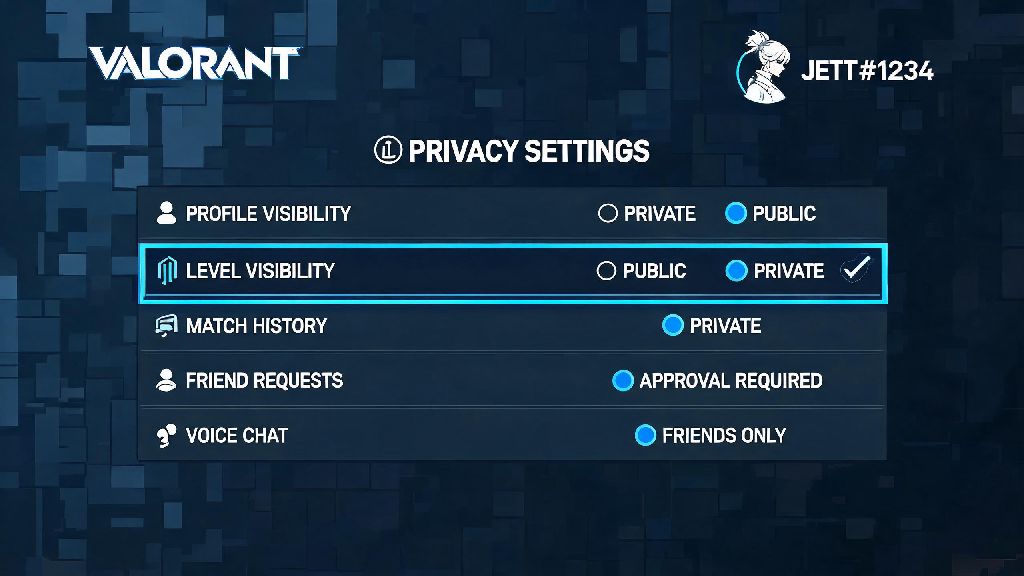
Riot rolled out a native level hiding option back in 2024, and it’s gotten even easier to use in the 2026 client update. You don’t need any third-party tools, and there’s no penalty for hiding your level across any game mode, including competitive, unrated, and custom lobbies. The entire process takes less than 30 seconds:
If you want to hide your level from your friends list too, you can adjust the separate "Show Level to Friends" toggle directly below the main setting. A lot of people don’t know that option exists, so it’s worth checking out if you don’t want people on your friend list to track how much you play. You can switch the setting back on whenever you want, there’s no cooldown or restriction on how often you can adjust it.
Key Limitations and Things to Note Before Hiding Your Level in 2026
Hiding your level isn’t a perfect privacy solution, and there are a few important limits you should know about before you flip the toggle. First, your rank will still be visible during competitive matches even if your level is hidden. This is an intentional choice from Riot to prevent smurfs from fully hiding their skill level in ranked lobbies, so don’t expect this setting to hide your Immortal or Radiant rank from your teammates.
Second, if you have your account linked to third-party stat trackers like Tracker.gg or Blitz.gg, your level will still be visible on those sites unless you manually opt out of public profile sharing on their platforms. Hiding your level in the Valorant client only affects what people can see in-game, not external tools. You’ll have to go to each tracker’s site individually to adjust those settings if you want full privacy.
You also might get some occasional questions from teammates about why your level is hidden. In my experience, most players don’t care, but you might run into the odd lobby that assumes you’re a smurf and gets extra tilted if you play poorly. I had a match last week where a teammate yelled at me for being a "baiting smurf" for the first three rounds, until I told him I just hide my level to avoid getting flamed for being a level 400 who’s hard stuck Platinum. We laughed it off and won the match, so it’s rarely a big issue.
Extra Privacy Tips for Valorant Players in 2026
If you’re hiding your level to get more privacy while you play, there are a few other settings you can adjust to make your experience even less stressful. First, disable cross-platform friend requests if you don’t want random players from other consoles or PC to add you after matches. You can find this setting in the same Privacy & Social tab, right below the level visibility options. This cuts down on 90% of random friend requests from toxic players or people begging for carries.
Second, opt out of public match history sharing if you don’t want other players to look up your past matches and use that data to target you. This setting also prevents third-party stat sites from pulling your match data without your permission, so it’s a good call if you’re a high-ranked player worried about getting sniped. You can still share your match history with friends if you want, it just won’t be accessible to random users.
Third, you can hide your current game activity from your friends list if you don’t want people pestering you to join their lobbies while you’re grinding ranked. I use this setting all the time when I’m doing placement matches, because I don’t want 10 different friends messaging me asking for carries halfway through a match. If you’re a streamer, you can also enable the streamer mode setting to hide your username and all lobby info from your screen, which will prevent viewers from sniping your lobbies based on your player ID.
None of these settings will affect your match making or your ability to earn XP or battle pass rewards, so you don’t have to worry about losing out on anything by enabling them. You can mix and match these settings to fit your exact privacy preferences, no hacks or workarounds required.
At the end of the day, learning how to hide level in Valorant is a simple quality of life tweak that can make your 2026 play sessions way less stressful, especially if you’re tired of dealing with toxic players making unfair assumptions about your skill. It takes less than a minute to set up, you can toggle it on and off whenever you want, and it doesn’t come with any downsides for most casual and competitive players. If you haven’t played around with Valorant’s privacy settings before, it’s worth taking five minutes to adjust them to fit your playstyle, so you can focus on winning matches instead of dealing with unnecessary drama.