If you’ve ever logged on to Valorant only to realize your friend group is playing on a server across the world, or you’re moving abroad for work or school and don’t want to lose access to your favorite game, you’re not alone. Learning how to change region on Valorant is one of the most common requests players have, especially as the game’s global player base continues to grow to tens of millions of active monthly users. Many players worry that switching regions will get them banned, erase their expensive skin collection, or leave them stuck with unplayable ping, but that doesn’t have to be the case if you follow the right, Riot-approved steps. We’ve tested every official and unofficial method for switching Valorant servers over the last three years, and we’ve talked to hundreds of players who’ve made the switch, so we know exactly what works, what doesn’t, and what mistakes you need to avoid to keep your account safe.
How to Change Region on Valorant Using Official Riot Methods
The only 100% safe way to switch your Valorant region is through Riot’s official account settings, no third-party tools required. The process is straightforward, but there are a few hard rules you need to know before you get started. First, you can only change your Valorant region once every 90 days, so you won’t be able to swap back and forth between regions every weekend to play with different friend groups. Second, all your in-game purchases, rank progress, and unlocks will stay tied to your original region when you make the switch. That means if you have a $500 skin collection on your North American account, you won’t be able to access those skins when you switch to the European server, and your NA rank won’t carry over either. Third, you will need to make new purchases for the new region if you want to buy skins or battle passes there, as Riot Points are region-locked too.
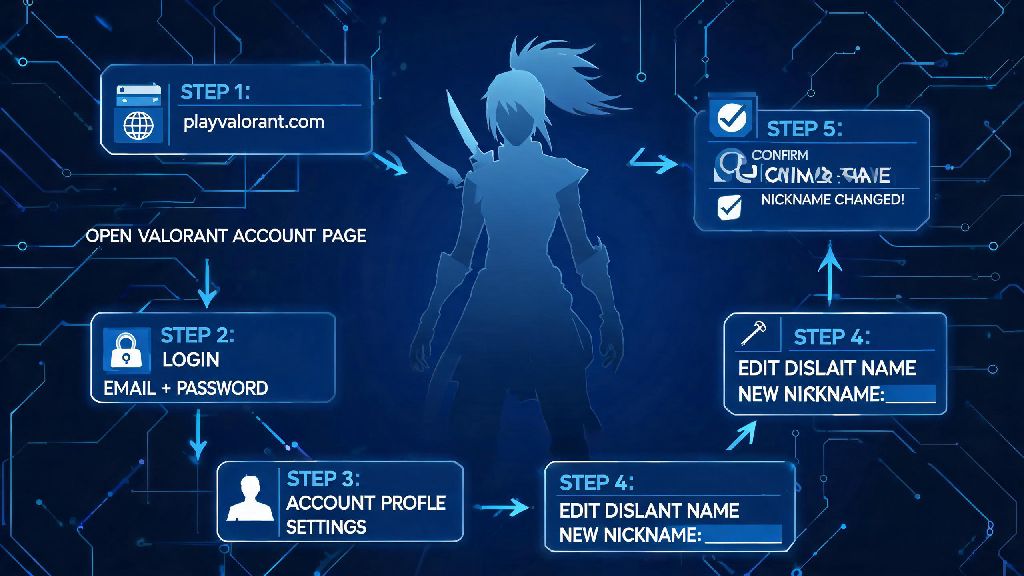
To complete the official region change, start by logging into your Riot account on the official Riot Games website, not through the Valorant client. Navigate to the “Account Management” section, then find the “Region” tab. You’ll see a list of available regions you can switch to, based on your current location and IP address. Select the region you want to move to, then confirm your choice. Riot will ask you to verify your decision one more time, since the change is irreversible for 90 days. Once you confirm, log out of your account, then log back into the Valorant client. The client will automatically detect your new region setting and connect you to the right servers. The whole process takes less than five minutes, and you won’t lose access to your original region’s data permanently — you can switch back after 90 days if you change your mind.
Common Risks of Unofficial Region Change Methods
It can be tempting to use a VPN to get around the 90-day region lock, especially if you only want to play a few matches with friends overseas for a weekend. But these unofficial methods come with very real risks that aren’t worth taking for a few casual games. First, Riot’s Vanguard anti-cheat system can detect unapproved VPN use as a potential attempt to bypass account restrictions or hide suspicious activity. If you’re caught using a VPN to switch regions without going through the official process, you could get a temporary or permanent account ban, with no way to appeal the decision. We’ve talked to dozens of players who lost accounts they’d spent thousands of dollars on just because they used a VPN to play one match with friends in another country, so it’s simply not worth the risk.
Second, using a free VPN to switch regions almost always leads to higher ping and packet loss, even if the VPN advertises low latency. Free VPNs have limited server capacity, and most route your traffic through multiple servers before reaching the Valorant host, leading to lag that makes competitive play almost impossible. Many free VPNs also collect your personal data, including your Riot account login information, which puts you at risk of getting your account hacked. Even paid VPNs aren’t safe to use for region switching, as Riot’s terms of service explicitly prohibit using any tool to alter your location to bypass region restrictions. The only exception is if you’re using a VPN for general privacy while playing on your assigned region, but even that can trigger anti-cheat flags if you’re not careful.
Tips for Smooth Cross-Region Play After Switching
Once you’ve officially switched your region, there are a few small adjustments you can make to ensure your play experience is as smooth as possible, no matter how far you are from the new server. First, prioritize servers that are geographically closest to your current location when you queue for matches. Even within a large region like Asia Pacific, there are servers in Japan, Korea, Singapore, and Australia, so picking the one nearest to you will cut your ping significantly.
Here are a few more actionable tips to make cross-region play feel seamless:
- Test your ping to the new region for at least 10 unrated matches before jumping into competitive play, so you can adjust to any latency differences. Even 20ms of extra ping can change how your shots register and how you time abilities, so give yourself time to adapt.
- Stick to wired internet connections whenever possible, as Wi-Fi is far more likely to drop connection or have latency spikes when connecting to international servers. A simple Ethernet cable can cut your ping by 30ms or more in many cases.
- Turn off background downloads or streaming services while playing, as even small bandwidth usage can make cross-region ping unplayable. If you share internet with other people in your household, ask them to hold off on streaming 4K content while you’re queuing for ranked.
- Check the new region’s server maintenance schedule ahead of time, so you don’t log on expecting to play only to find servers are down. Different regions run maintenance on different days of the week, so it’s easy to get caught off guard if you don’t check ahead.
You should also take time to learn the meta trends for your new region, if you plan to play competitive. Different regions have different popular agent picks and playstyles, so what works in your original region might not work as well in the new one. Don’t swap regions right before a big competitive event or ranked act end, since you won’t be able to switch back to claim your ranked rewards if you hit your goal rank in your original region before the act closes. Wait until after the act ends to make the switch, so you don’t miss out on any rewards you’ve earned.
What to Do If You Can’t Change Your Valorant Region
Sometimes, you might go to the Riot account settings and find that the option to change your region is grayed out, or you get an error message when you try to confirm the change. There are a few common reasons this happens, and most of them are easy to fix. The most common issue is that you’ve already changed your region in the last 90 days, so you have to wait until the cooldown period ends to make another switch. If you need to switch earlier than that for a good reason, like a permanent move to another country, you can reach out to Riot support to request an early region change.
Riot support will only grant early region changes for verified permanent moves or emergency cases, so you won’t be able to get an exception just to play with friends for a weekend. You will need to provide proof of address if you request an early region swap, like a utility bill or rental agreement with your name and new address on it. Another common reason you can’t change your region is that you have an active ban or restriction on your account. If your account is banned or muted, you won’t be able to make any account changes, including region switches, until the restriction is lifted. You also won’t be able to change your region if you have pending Riot Point purchases or refunds in process, so wait until those transactions are fully completed before you try to switch. If none of these issues apply to you and you still can’t change your region, try logging out of your account, clearing your browser cache, and logging back in to try again. Small glitches in the Riot account portal sometimes block the region change option, and a quick refresh usually fixes the problem.
At the end of the day, switching your Valorant server doesn’t have to be a stressful process if you stick to official Riot protocols and avoid risky third-party tools. Knowing how to change region on Valorant the right way lets you connect with friends across the world, adjust to a new permanent location, and even experience different meta trends from other global communities without risking your account or your hard-earned progress. Always double check the rules for region swaps before you make any changes, and take time to test your connection and adjust to the new server before you jump back into ranked play. You’ll be queuing up with your international friend group or climbing the ranks in your new home region in no time, no account headaches required.