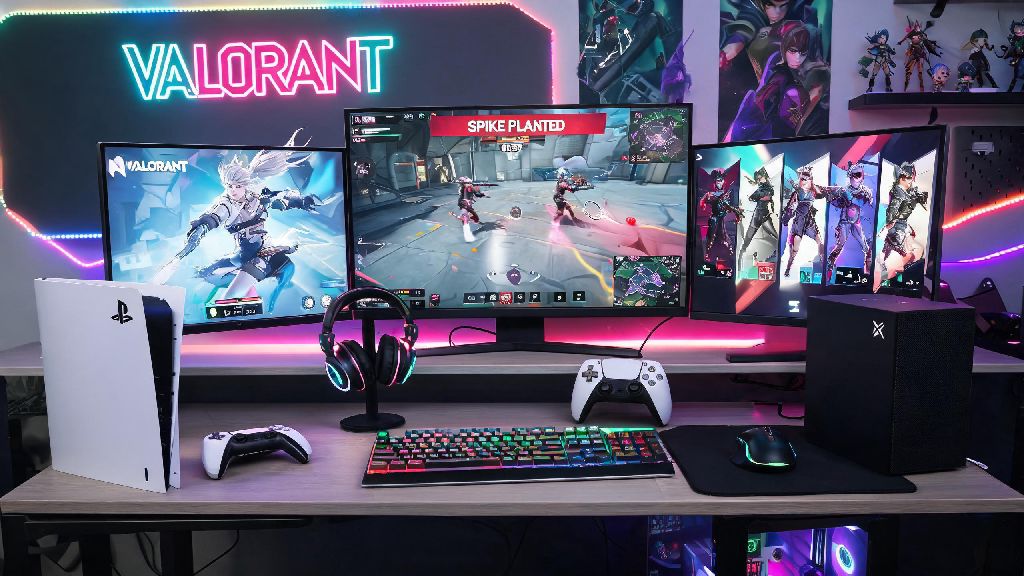
If you’ve had friends rave about Valorant’s fast-paced tactical matches and unique agent abilities, your first question is probably what platforms is Valorant on, and whether you can jump in without buying expensive new gear. Riot Games’ hit 5v5 shooter has grown far beyond its original PC launch over the past few years, with support for more devices rolling out to meet player demand. I’ve played Valorant on both PC and console for over 12 months, so I’ve got first-hand insight into how the experience holds up across every supported device, plus what you can expect if you pick a specific platform for competitive or casual play.
What Platforms Is Valorant On Right Now?
Riot has rolled out support for a small but growing list of devices, with strict requirements to keep gameplay fast and fair for all users. Unlike many popular shooters that support last-gen consoles and lower-powered devices, Valorant’s 128-tick servers and competitive focus mean it’s only available on devices that can keep up with its performance demands. Below is a full breakdown of all supported and unsupported platforms, plus key details you need to know:
You might be wondering why popular devices like the Nintendo Switch or PS4 are left off the official support list. Riot has stated that older consoles and lower-powered portable devices can’t consistently hit the minimum 60fps required to keep competitive play fair, so they have no plans to launch Valorant on those devices for the foreseeable future. Mac and Linux users can run the game using workarounds like Proton, but these are not officially supported, so you may run into performance issues, anti-cheat errors, or even account bans if the anti-cheat system flags the workaround as suspicious.
Crossplay Rules Across All Supported Valorant Platforms
One of the biggest perks of Valorant’s multi-platform launch is full crossplay support, so you can queue up with friends no matter what device they play on. Crossplay is enabled by default when you first launch the game, but you can adjust this setting at any time if you don’t want to match with players on other devices. Input-based matchmaking is active by default, so controller players will only be matched with other controller users, unless you queue up with a friend who uses mouse and keyboard. That means you won’t be at a disadvantage if you prefer playing on console with a controller, even if crossplay is turned on.
You also get full cross-progression across all supported platforms, as long as you link your Riot account to your console profile before you start playing. Cross-progression is 100% free, and you’ll keep all your skins, battle pass progress, rank, and unlocked agents no matter what device you log in from. The only catch is that any platform-exclusive skins (like the PS5-themed skin pack) will only be accessible when you log in from that specific platform, but all other content carries over freely.
If you’re worried about running into cheaters from other platforms, don’t be. Riot’s Vanguard anti-cheat works the same across all supported devices, and cheat detection rates are identical no matter what platform a player is using. You can disable crossplay entirely in your game settings if you only want to match with players on the same device as you, though you may see longer queue times for ranked modes if you turn this off.
Performance Differences Between Valorant Platforms
Even though the core gameplay is identical across all supported platforms, there are noticeable performance differences that matter most if you play competitive ranked. I’ve hit Immortal rank on both PC and PS5, so I’ve experienced these differences first hand. PC is the most flexible option by far. If you have a mid-tier gaming PC (16GB RAM, GTX 1660 or equivalent), you can easily run Valorant at 144fps on 1080p, which is more than enough for casual and mid-tier competitive play. High-end PCs can hit 240+ fps, which gives you a tiny but noticeable edge in fast-paced gunfights where every millisecond counts. PC is the best choice for competitive players chasing the highest possible fps and lowest input lag, plus you get full control over graphics settings to prioritize performance over visuals, or vice versa.
Console performance is surprisingly solid, even if it can’t keep up with high-end PCs. Both PS5 and Xbox Series X can hit 120fps at 1440p, with very low input lag that’s almost indistinguishable from mid-tier PC setups. The Xbox Series S hits 120fps at 1080p, or 60fps at 1440p, depending on the graphics mode you choose. Console versions have pre-optimized settings, so you don’t have to mess with sliders or config files to get the best possible performance. The only downside is that you can’t tweak individual graphics settings like you can on PC, so you’re stuck with the pre-set performance or quality modes Riot provides.
Mobile beta performance varies a lot depending on your device, but Riot requires at least 4GB of RAM and a mid-tier processor to run the game at 60fps. Keep in mind that the mobile beta is only available in a handful of regions, and there’s no guarantee your device will be supported even if it meets the minimum specs when the global launch happens.
Tips to Pick the Right Valorant Platform for You
Picking the right platform mostly comes down to what gear you already own, and what kind of playstyle you prefer. You don’t need to go out and buy a new device just to play Valorant, unless you’re dead set on climbing to the highest competitive ranks. If you already own a gaming PC that can run the game at 144fps or higher, stick with PC. Competitive players will get the most benefit from PC’s higher fps cap and customizable settings, plus you’ll have access to the biggest player pool for ranked modes, which means shorter queue times.
If you don’t have a gaming PC but own a PS5 or Xbox Series X/S, the console version is a fantastic option. It’s completely free to play just like the PC version, and Xbox users can even get free in-game rewards if they have an active Game Pass subscription. Casual players will have just as much fun on console as they would on PC, especially if they prefer playing with a controller. I mostly play unrated matches with my friends on console these days, and I’ve never felt like I’m missing out on anything compared to when I play on PC.
If you mostly play with friends who are on a mix of devices, any supported platform works perfectly. Crossplay is seamless, and you won’t notice any major differences in gameplay when queued with friends on other devices. Always link your Riot account before playing on a new platform to make sure you don’t lose any progress if you switch devices later on. No matter which platform you pick, you’ll get access to all game modes, new agent releases, and battle pass content at the same time. Riot doesn’t lock any core content behind specific platforms, so you won’t miss out on anything if you choose to play on console instead of PC.
Now that you know what platforms is Valorant on, you can stop worrying about device compatibility and jump straight into your first match. Whether you’re playing on a high-end gaming PC, a PS5 on your living room TV, or testing the mobile beta during your commute, the core fast-paced tactical gameplay that makes Valorant so popular stays exactly the same. If Riot announces support for new platforms down the line, they’ll share full details on official channels first, so keep an eye out for updates if you’re waiting for support for your preferred device. At the end of the day, the best platform to play Valorant on is the one you already have access to – don’t let gear snobs convince you otherwise.